ProductivityComing Soon
Task Manager
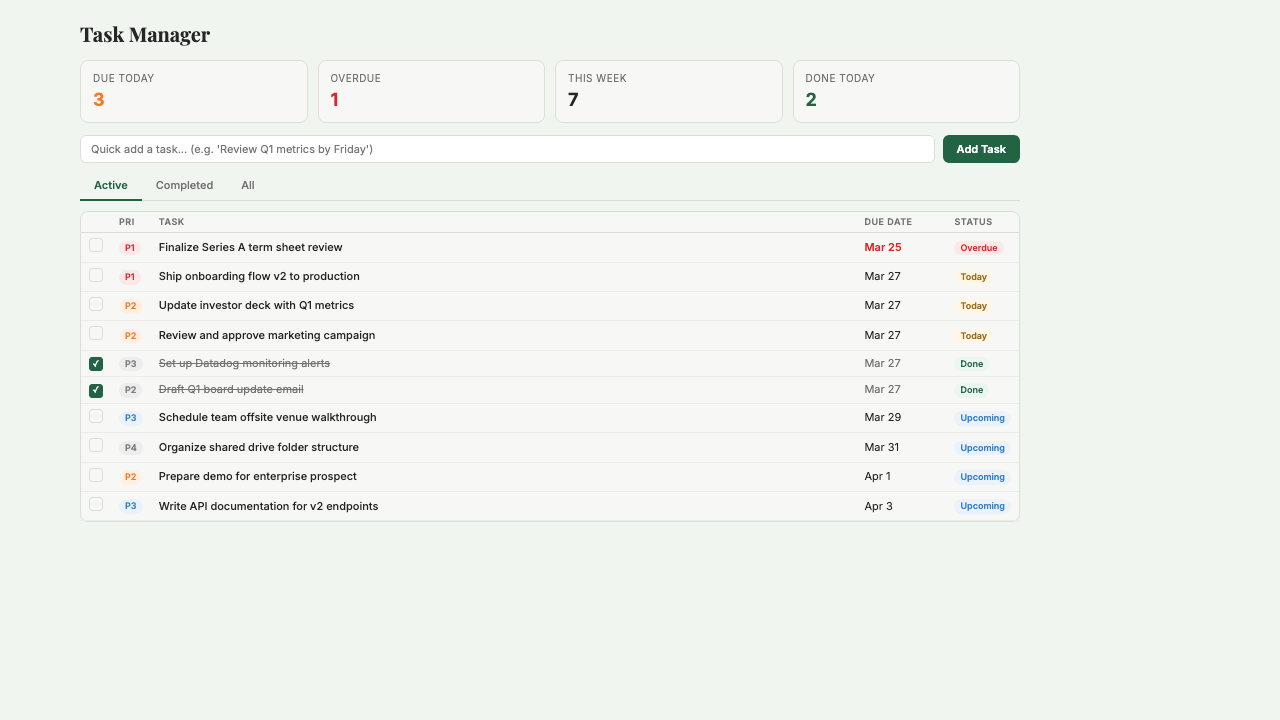
Track tasks, set priorities, and stay on top of deadlines. A simple, focused task list with priority levels, due dates, and custom ordering.
What is Task Manager?
Task Manager is a focused personal task list with P1–P4 priority levels, due date tracking, overdue alerts, and multiple views (list, kanban, filtered). It does one thing well: keep your tasks organized by priority and deadline so you always know what to work on next. You can capture tasks via chat ('remind me to review the Q1 report by Friday') and track weekly completion to see how productive you actually were. Built for operator founders who don't need a full project management suite — just a reliable place to track what they owe, to whom, and by when. Currently in development; request beta access.
Key Features
Who it's for
- Operator founders who track tasks in their head and keep dropping things
- Founders using sticky notes, Apple Reminders, or Slack messages to track work
- Solo operators who don't need team collaboration — just a personal task system
- Small teams that want lightweight task tracking without the overhead of project management
Example workflows
Start your day with a prioritized task list
- 1Open Task Manager and review today's P1 and P2 tasks.
- 2Check for anything overdue that slipped from yesterday.
- 3Capture any new tasks that came in overnight via email or Slack.
- 4Work through the list in priority order — P1 first, then P2.
Weekly review and planning
- 1Review what you completed this week — celebrate the wins, note the misses.
- 2Move any incomplete tasks to next week and adjust their priority if needed.
- 3Add new tasks for next week from meeting notes, emails, or your own ideas.
- 4Set P1 and P2 priorities for Monday so you can start the week with clarity.
What you can ask
"What tasks are due today?"
"Show me all overdue tasks"
"Create a task to review the Q1 report by Friday"
"What did I complete this week?"
"What are my highest priority tasks?"
Frequently asked questions
When does Task Manager launch?
Currently in development. Request beta access and we'll notify you when it's available. In the meantime, Project Management covers most task tracking needs for small teams.
How is this different from Project Management in Starch?
Project Management is a team tool with Kanban boards, assignees, and workload reporting. Task Manager is a personal tool — just you, your priorities, and your deadlines. If you're a solo operator, Task Manager is likely all you need. If you work with a team, Project Management is the better fit.
Can I use natural language to create tasks?
Yes. Type 'review the investor update by Friday, P1' and Starch creates a task with the right priority and due date. No forms, no clicking through dropdowns.
Does it integrate with my calendar?
Due dates show as reminders, but Task Manager is not a calendar — it's a priority-ordered list. For calendar-based scheduling, use the Scheduling app. The two are complementary: calendar for meetings, Task Manager for work.
What are P1 through P4 priorities?
P1 is urgent and important (do today). P2 is important but not urgent (do this week). P3 is nice to do (do when you have time). P4 is backlog (capture it so you don't forget, but no deadline pressure). You decide what each level means to you.
Can I see what I completed each week?
Yes. Weekly completion tracking shows how many tasks you finished, by priority level. It's a simple productivity signal — not a gamified streak counter, just an honest look at throughput.
Be the first to use Task Manager
Task Manager is in development. Join the waitlist and we'll notify you when it launches.
You're on the list! We'll be in touch soon.