Productivity
Scheduling
Share your availability and let anyone book meetings with you. Syncs with Google Calendar for real-time availability.
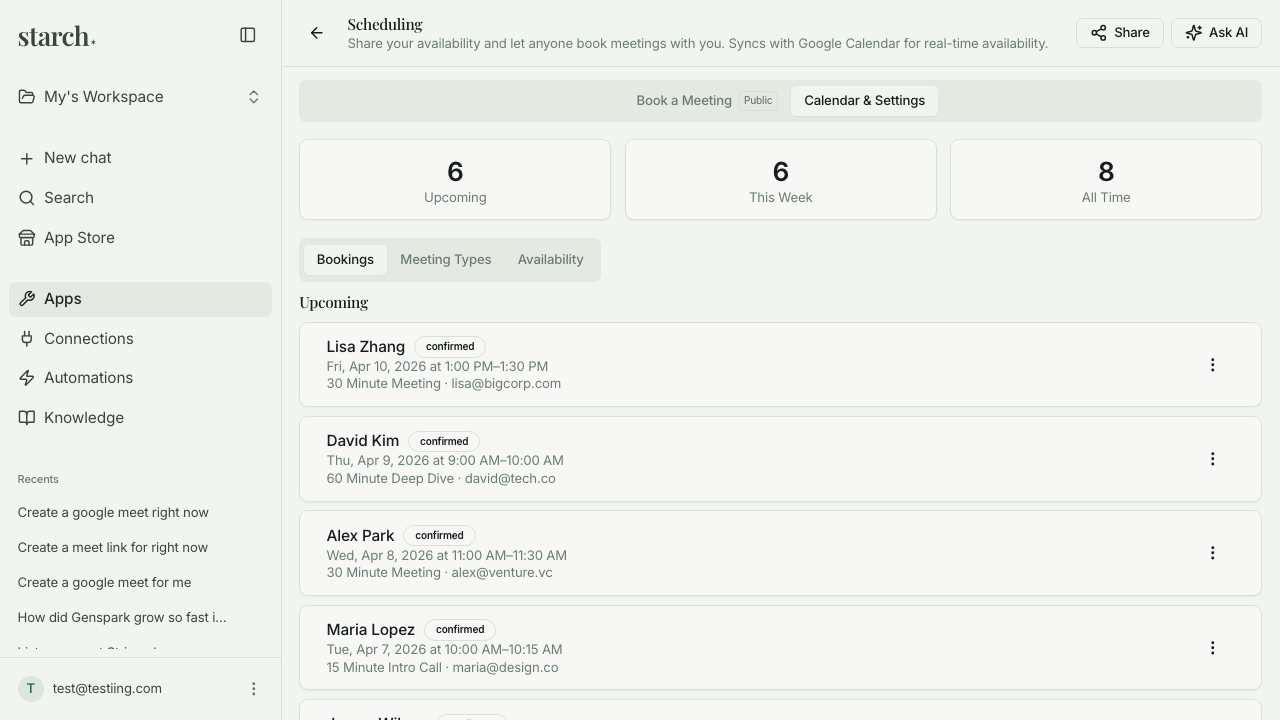
What is Scheduling?
Scheduling gives you a public booking page that syncs with your Google Calendar in real time, so anyone can see your available slots and book a meeting without the back-and-forth emails. You set your weekly availability rules, create different meeting types (15-min intro, 30-min call, 60-min deep dive), add buffer time between meetings, and share the link on your website, email signature, or in messages. When someone books, it creates a calendar event for both of you automatically. Built for operator founders who spend too much time on 'when are you free?' threads when a simple booking link would solve it.
Key Features
Who it's for
- Operator founders who waste 10+ minutes per meeting just scheduling it
- Founders who take sales or partnership calls and need a frictionless booking experience
- Small teams setting up office hours for customers, investors, or team members
- Anyone currently using Calendly who wants scheduling bundled into the Founder Stack
Example workflows
Set up your booking page
- 1Connect your Google Calendar via OAuth.
- 2Set your weekly availability (e.g., Monday–Friday, 9am–5pm ET).
- 3Create your meeting types — name, duration, buffer time, and any instructions for the booker.
- 4Share the booking link in your email signature, website, or LinkedIn.
Manage a busy week of external calls
- 1Check your upcoming bookings for the week in Scheduling's dashboard.
- 2Block out any focus time you need by adding events to your Google Calendar — they'll automatically prevent bookings.
- 3If you need to reschedule, cancel the booking and the other person gets a link to rebook.
- 4After each call, the meeting flows into Meeting Notes (if connected) for automatic transcription.
What you can ask
"Show me my upcoming bookings for this week"
"How many meetings do I have scheduled?"
"Cancel the meeting with John tomorrow"
"What are my busiest days this month?"
"Add a new 45-minute meeting type called Strategy Session"
Frequently asked questions
How is this different from Calendly?
Core functionality is similar — booking page, calendar sync, meeting types. The difference is that it's bundled into the Founder Stack at no extra cost, so you're not paying $12/month for yet another standalone tool. If you need Calendly's advanced features (routing, team scheduling, Salesforce integration), use Calendly. If you need a booking page and nothing more, Scheduling does the job.
Does it sync with Google Calendar?
Yes, two-way sync via standard OAuth. Your existing calendar events block out availability automatically, and new bookings create calendar events for both you and the person booking.
Can I set different availability for different meeting types?
Yes. For example, you might offer intro calls only on Tuesdays and Thursdays, but deep dives any day. Each meeting type has its own availability rules.
Does it handle time zones?
Yes. The booking page shows your available slots in the booker's local time zone. No more 'wait, was that Eastern or Pacific?' confusion.
Can I add buffer time between meetings?
Yes. You can set a buffer (e.g., 15 minutes) before or after each meeting type so you're not booked back-to-back with no breathing room.
Is the booking page customizable?
Basic customization is available — your name, photo, meeting type descriptions, and availability rules. For heavy branding (custom domains, embedded widgets), Calendly still has more options.
Get started with Scheduling
Join founders already using Starch to run their business smarter.
You're on the list! We'll be in touch soon.