Productivity
Project Management
A Linear-inspired project management tool built for early-stage teams. Kanban board, list view, priority tracking, and AI-powered task management — all without leaving Starch.
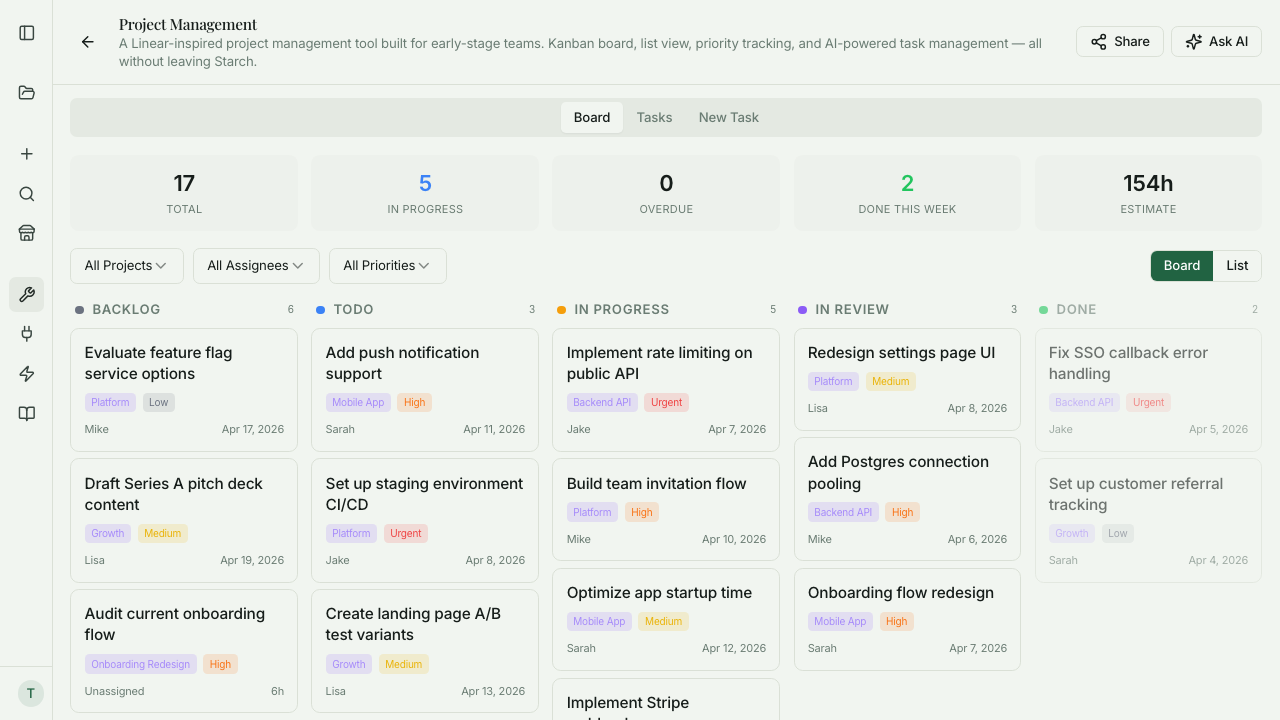
What is Project Management?
Starch Project Management is a Linear-inspired task tracker built into the Founder Stack, so you don't have to maintain yet another subscription for the basics. Kanban board, list view, priority tracking, project and tag grouping, and workload reporting — all the features you'd expect from a modern project tool. The difference is that AI handles task management by voice or prompt: 'create a task for Jake to fix the login bug, urgent, due Friday' creates the task, assigns it, and sets the due date without clicking through a form. Built for small teams (2–10 people) that need structure but don't want to pay for Linear, Asana, or Jira and hire an admin to configure them.
Key Features
Who it's for
- Small teams that outgrew a shared spreadsheet but can't justify Linear or Asana pricing
- Operator founders running a small engineering team alongside the rest of the business
- Two-person teams tracking product, marketing, and ops work in the same place
- Founders who want a simple tracker without hiring a project manager to run it
Example workflows
Set up your team's first project
- 1Create a new project (for example, 'Q2 Product Roadmap') and invite your team members.
- 2Add a few top-level tasks via natural language: 'Jake, design the onboarding flow, high priority, due next Friday.'
- 3Organize tasks on the Kanban board by status: Backlog, In Progress, Review, Done.
- 4Check the workload view to confirm no one is overloaded before you kick off.
Daily standup in 2 minutes
- 1Ask Starch to show you everyone's in-progress tasks.
- 2Review what each person is working on and flag any blockers.
- 3Move completed tasks to Done; move blocked tasks to a Blocked column so they don't get lost.
- 4Share a standup summary in Slack or email via Starch's export.
What you can ask
"Create a task for Jake to fix the login bug, urgent priority, due Friday"
"What's Sarah working on right now?"
"Show me all overdue tasks"
"How much work does each person have assigned?"
"Move all completed tasks from last week to Done"
Frequently asked questions
How does this compare to Linear?
Starch Project Management is intentionally simpler. It shares the clean UX and keyboard-first feel, but skips the deep engineering workflow features (Git integrations, complex triage queues, sprint analytics). If you're a 30-person eng team, use Linear. If you're a 2–10 person team that wants Linear's aesthetic without the complexity, Starch is a good fit.
Can I import from Linear, Asana, or Jira?
Yes, via CSV export/import. Task titles, status, assignee, and due dates are preserved. Custom fields and comments may need manual handling depending on the source tool.
Does it support sprints?
Yes, lightly. You can create a sprint as a project with a date range, pull tasks into it, and track completion. Burndown charts and velocity tracking are not yet in — that's on the roadmap. For now, sprint work is possible but not as rich as a dedicated sprint tool.
Does the AI create tasks on its own?
No. The AI only creates tasks when you explicitly tell it to. It won't spontaneously create tickets based on what it thinks you meant in a conversation. If you want a task, you ask for one.
Can I use it for non-engineering work?
Yes. Marketing campaigns, content pipelines, ops projects — anything that benefits from a Kanban board. The AI task commands work the same way regardless of domain: 'create a task for Sarah to draft the launch email, due Thursday.'
Is there a mobile app?
The web app is mobile-responsive, but there's no native iOS or Android app yet. For quick task creation on mobile, voice input into the AI prompt works well — faster than tapping through a form.
Get started with Project Management
Join founders already using Starch to run their business smarter.
You're on the list! We'll be in touch soon.