Marketing
LinkedIn Automation
Your LinkedIn on autopilot — manage connections, engage with your network, and grow your presence. All powered by browser automation that runs on your behalf throughout the day.
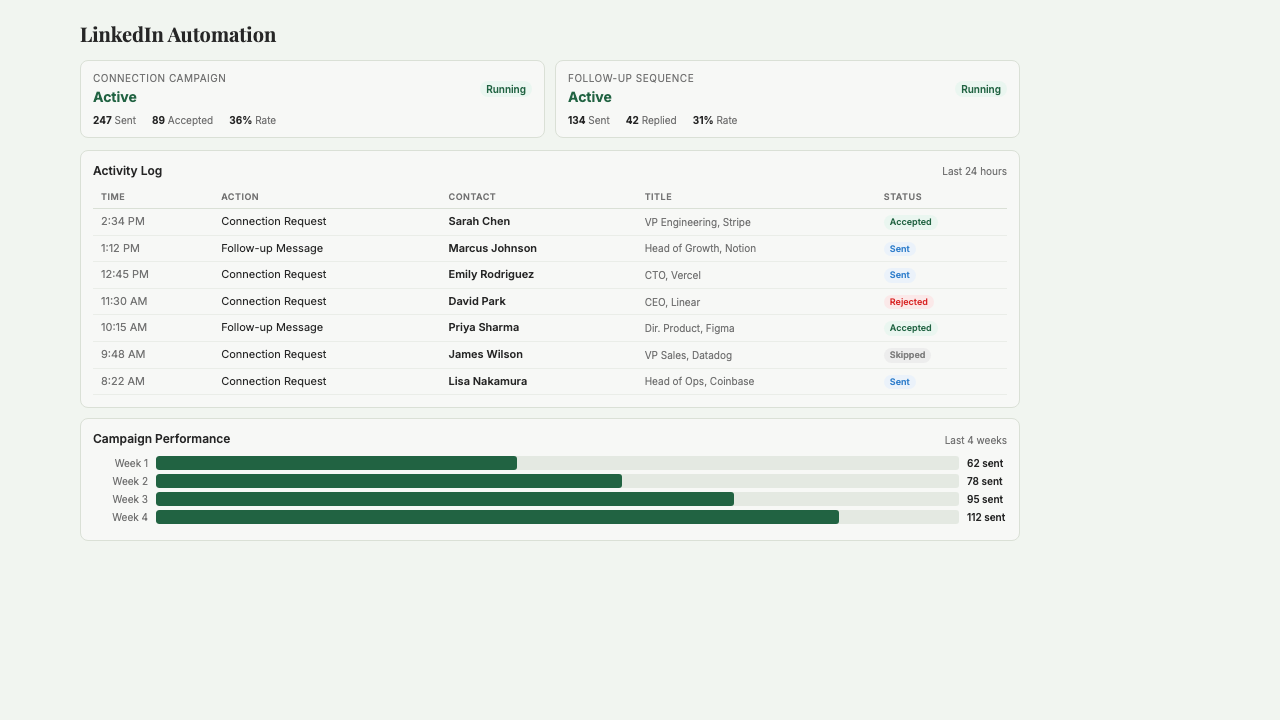
What is LinkedIn Automation?
LinkedIn Automation runs your LinkedIn presence on autopilot through the day. It reviews incoming connection requests using criteria you set (job title, industry, seniority), sends targeted outbound invites to people matching an ICP you describe in plain English, and leaves thoughtful comments on posts from operators and founders in your feed. Everything runs through browser automation on your behalf, meaning LinkedIn sees normal human-paced activity instead of API calls — which keeps your account safe from the account limits that hit most automation tools. Built for operator founders who know LinkedIn is where their buyers and peers hang out but don't have time to spend an hour a day on it, and for small teams building founder-led outbound without burning out a human doing the grunt work.
Key Features
Who it's for
- Operator founders who know LinkedIn drives leads but can't carve out daily time for it
- Founders in CPG, real estate, and services where LinkedIn is where buyers actually are
- Two-person teams running founder-led outbound without a sales development rep
- Operators building visibility through consistent engagement with their target audience
Example workflows
Set up daily LinkedIn automation
- 1Connect your LinkedIn account to Starch (one-time browser-based login).
- 2Describe your ideal connection criteria in plain English — titles, industries, and any filters to exclude (like recruiters or agency pitches).
- 3Set the daily volume: how many connection requests to send, how many to auto-accept, and how many posts to comment on.
- 4Turn on the automation and watch the daily activity log — review any edge cases Starch flagged.
- 5Check the daily summary email each morning to see what happened while you slept.
Run a targeted outbound campaign for a specific ICP
- 1Describe the ICP you want to reach — for example, 'operations leaders at CPG brands with 5–50 employees in the US.'
- 2Set the personalized connection note template, leaving placeholders for first name, company, and a hook about a recent post.
- 3Tell Starch how many invites to send per day (30 is a safe cap).
- 4Review the first batch of drafted connection notes before they go out, then approve the campaign.
- 5Starch sends the invites over the following days and alerts you whenever a recipient accepts or replies.
What you can ask
"Show me all connections accepted this week"
"How many outreach invites have been sent?"
"Change my acceptance criteria to focus on VCs and founders"
"Enable connection outreach"
"Show me who was rejected and why"
Frequently asked questions
Won't LinkedIn ban my account for using automation?
LinkedIn bans accounts that hammer their API with obvious bot behavior — fast, API-driven, hundreds of actions per hour. Starch uses browser automation that runs at human pace on your behalf, respects LinkedIn's rate limits, and takes natural pauses between actions. It's the same approach the serious automation tools use, and it's why accounts using Starch don't get flagged the way ones using cheap API scrapers do. You're still subject to LinkedIn's terms of service, which you should read.
How do the AI accept/reject decisions work?
You describe your criteria in plain English — 'founders and operators in CPG, real estate, or asset management; no recruiters; no agencies pitching services.' Starch reads each incoming request's title, company, and mutual connections, and accepts or rejects based on your criteria. You can review the full log of decisions and override any of them. The criteria improve over time as you adjust edge cases.
What counts as 'targeted outbound'?
You tell Starch who you want to connect with — 'founders at CPG brands under 10 employees in North America' — and it searches LinkedIn for matching people, reviews their profiles, and sends a connection request with a personalized note. You set the daily volume (usually 10–30 invites per day to stay safe) and Starch paces them throughout the day.
Does it write the comments for me?
Yes, optionally. You tell Starch the topics and tone you want to engage on, and it drafts thoughtful comments on posts from accounts you follow. You review drafts before they go live — no auto-posting. The goal is consistent visibility without the chore of reading every post in your feed.
Can I use it alongside my real manual LinkedIn activity?
Yes, that's the normal setup. Starch handles the repetitive work — accepting inbound, running outbound campaigns, scheduled commenting — while you still do personal messaging, direct conversations, and anything that benefits from your judgment. Think of Starch as the bottom of the LinkedIn funnel so you can focus on the top.
What happens if someone replies to a connection message?
Starch detects replies and pauses automation on that thread so you can take over the conversation manually. You'll get a daily summary of new replies, and you respond through LinkedIn directly. Starch never drafts replies on your behalf without your approval.
Get started with LinkedIn Automation
Join founders already using Starch to run their business smarter.
You're on the list! We'll be in touch soon.