Marketing
CRM
A customizable CRM that adapts to your workflow. Describe how you work and AI designs a CRM tailored to you — or import from an existing CRM.
What is CRM?
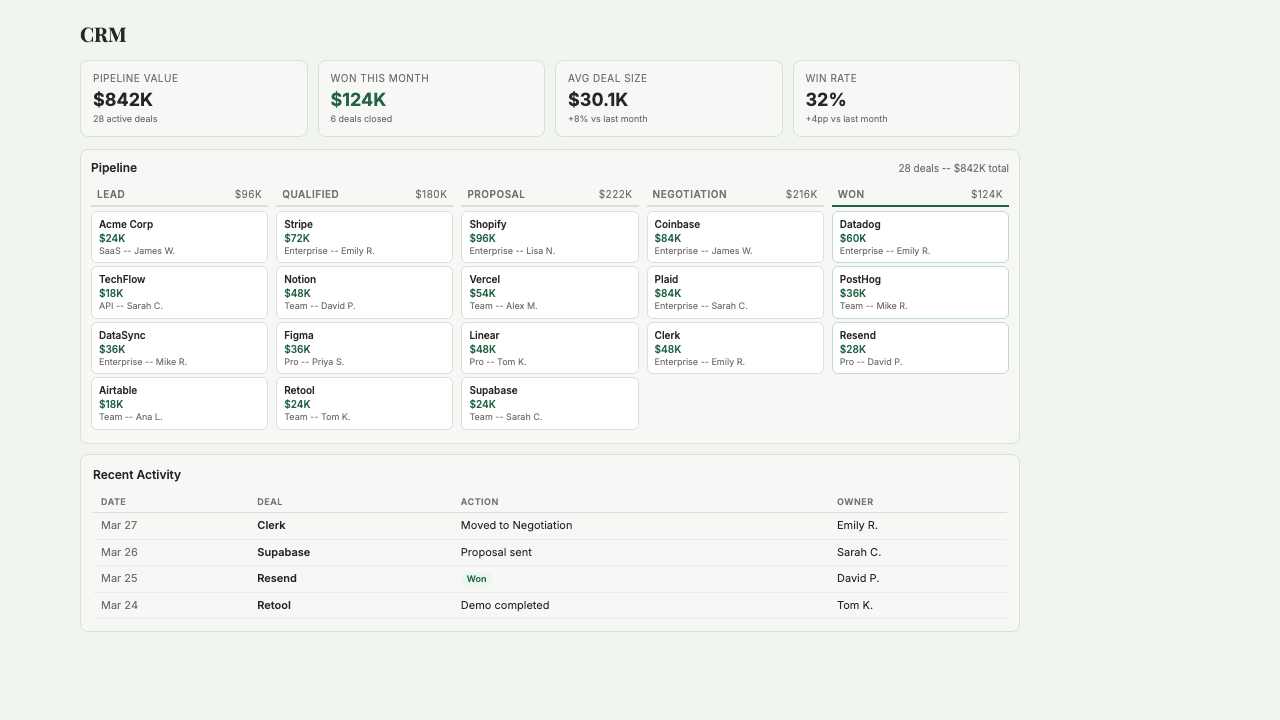
Starch CRM is an AI-designed customer relationship manager that adapts its schema to how you actually work, instead of forcing you to learn someone else's pipeline. Describe your sales process — the stages, the fields that matter to you, the data you track — and AI builds a CRM tailored to you. Or import from an existing CRM and have Starch clean up the mess. It handles the usual: contacts, companies, deals, email thread history, customizable pipeline stages, and LinkedIn enrichment that keeps profiles current. You can ask it questions like 'who haven't I spoken to in 30 days?' and get a real answer, not a canned report. Built for operator founders who've outgrown a spreadsheet but don't want to pay for HubSpot and hire an admin to configure it.
Key Features
Who it's for
- Operator founders tracking deals and relationships in a spreadsheet that's starting to break
- Small teams that tried HubSpot or Salesforce and found them overbuilt for their needs
- Real estate operators managing deal flow, brokers, and investor relationships
- Asset managers and advisors tracking LP relationships across multiple funds or deals
Example workflows
Set up a new CRM from scratch in under 30 minutes
- 1Tell Starch CRM how you sell — your stages, the fields you care about (deal size, close date, lead source), and the kinds of people you track (customers, prospects, partners).
- 2Review the generated schema and adjust any stage names or field types that don't match your reality.
- 3Connect your email (Gmail or Outlook) so thread history starts flowing in automatically.
- 4Import existing contacts from a CSV or your current CRM; Starch flags duplicates and missing fields during import.
- 5Start using it — the AI will suggest follow-ups based on stale contacts and email activity.
Weekly relationship maintenance on autopilot
- 1Ask Starch CRM to show you contacts you haven't spoken to in 30+ days.
- 2Review the list, filtered by deal stage or relationship priority.
- 3For each, view the last email thread and LinkedIn activity side-by-side to catch up in seconds.
- 4Draft a follow-up directly from the contact view and send it via your connected email.
What you can ask
"Show me all contacts I haven't spoken to in 30+ days"
"Who are my most active contacts on LinkedIn?"
"Which contacts need follow up?"
"Show my recent email threads with Alice"
"Summarize my relationship with contacts at Acme Corp"
Frequently asked questions
How is this different from HubSpot or Pipedrive?
The biggest difference is setup. HubSpot and Pipedrive ship with a fixed schema you're expected to conform to — if your sales process doesn't fit their model, you either force-fit or spend weeks customizing. Starch CRM works the opposite way: you describe your process in plain English and the AI builds the schema around it. For an early-stage founder, that usually means hours of setup instead of weeks.
Can I import from my existing CRM?
Yes. You can import contacts, companies, and deals from most major CRMs via CSV or direct connection. Starch will flag duplicates, stale contacts, and fields that don't map cleanly — so you start with a cleaner dataset than you had before.
Does it work for non-sales use cases?
Yes. A CRM is really just a relationship tracker, and Starch CRM's schema flexes to fit other workflows: investor relations (tracking LPs and rounds), partnership management (tracking integration partners and their status), hiring pipelines, and fundraising (tracking VCs and interest level). The underlying structure — people, organizations, stages, notes, history — is the same.
Does it integrate with my email?
Yes. Starch CRM pulls email thread history so you can see the full conversation with any contact without leaving the CRM. It supports Gmail and Outlook via standard OAuth. Your email stays in your inbox — Starch just indexes the threads for context.
What about LinkedIn enrichment?
Starch pulls public LinkedIn profile data for each contact — job title, company, location — and keeps it updated when people change jobs. This means you don't have to manually clean up your CRM every six months. LinkedIn data updates are governed by LinkedIn's terms of service.
Can I keep using my existing CRM alongside Starch?
Yes. Many teams run them in parallel during a transition. Starch can import from your existing CRM without breaking the original. If you decide to switch fully, your data comes with you — nothing is locked into Starch.
Get started with CRM
Join founders already using Starch to run their business smarter.
You're on the list! We'll be in touch soon.