FinancialComing Soon
Budgeting
Track budgets by category and compare against actual spend from your accounting system.
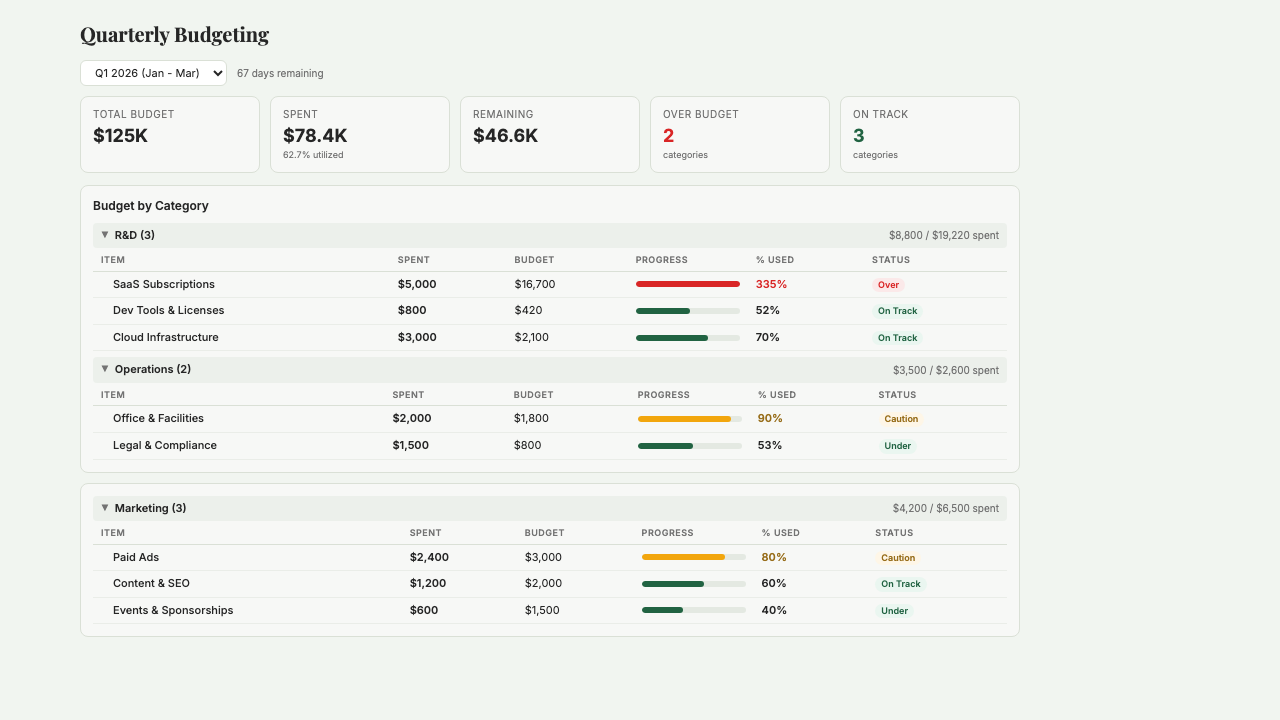
What is Budgeting?
Budgeting lets you set quarterly or annual budgets by category, compare them against actual spending from your connected accounting system, and see at a glance whether you're on pace or blowing past. It auto-generates suggested allocations from your historical spending patterns, so you're not starting from a blank spreadsheet. Pace indicators show each category's status — under budget, on track, over — with variance analysis showing exactly how much and why. Built for operator founders who've graduated from 'just wing it' spending but don't want to manage budgets in a spreadsheet. Currently in development; request beta access to get access when it launches.
Key Features
Who it's for
- Operator founders setting their first real budget after a funding round
- Small teams that keep blowing past their marketing or hiring budgets without realizing it
- Founders preparing for fundraising who need to show capital discipline
- Teams with multiple budget owners who want a shared view of what's allocated where
Example workflows
Set your first quarterly budget
- 1Connect your accounting system (QuickBooks or Xero) so Starch can see your historical spending.
- 2Review the suggested allocations based on your last 6 months — these are a starting point.
- 3Adjust any category where your plans for next quarter differ from history (planned hires, new ad spend, cut expenses).
- 4Save the budget; actuals update automatically as transactions post to your accounting system.
Mid-quarter variance check
- 1Open the Budgeting dashboard and scan the pace indicators across all categories.
- 2Drill into any category flagged as over budget for month-level detail.
- 3Identify whether the overage is a timing issue (a bill paid early) or a real overrun.
- 4Reallocate between categories if needed, or flag the overrun to the team and adjust behavior for the rest of the quarter.
What you can ask
"Create a budget for Q2 with Marketing, Engineering, and Ops categories"
"What is my total budgeted spend this quarter?"
"Compare my budget vs actual spending by category"
"Which categories are over budget?"
Frequently asked questions
When does Budgeting launch?
Currently in development and accessible via the closed beta. Request access and we'll notify you when it's live. In the meantime, Runway Analysis and Transaction Insights cover most of the 'how much am I actually spending' questions.
How does it decide what a good budget looks like?
It suggests allocations based on your historical spending over the last 6 months. You adjust from there — it's a starting point, not a prescription. The goal is to save you from building the first draft in Excel, not to tell you what your budget should be.
Does it connect to QuickBooks or Xero?
Yes. Actuals pull from whichever accounting system Starch is connected to, updating automatically as transactions post. You don't have to manually enter actuals or wait for a month-end close.
Can I set budgets at the department or project level?
Yes. Standard hierarchy is category into subcategory, and you can tag transactions to match your internal structure (by team, project, or initiative). You decide how deep to go based on how much granularity you actually want to maintain.
What happens when I go over budget?
You get alerts when a category hits 80% and again at 100% of its budget. Nothing is auto-blocked — it's informational, so you can decide whether to hold, reallocate, or blow past it intentionally. The tool is there to give you awareness, not to police spending.
Can I roll budgets forward to the next quarter?
Yes. At quarter end, you can copy the previous quarter's budget as a starting point and adjust from there. Most founders don't reinvent their budget every quarter — they tweak based on what they learned from the last one.
Be the first to use Budgeting
Budgeting is in development. Join the waitlist and we'll notify you when it launches.
You're on the list! We'll be in touch soon.